How the machine panel works
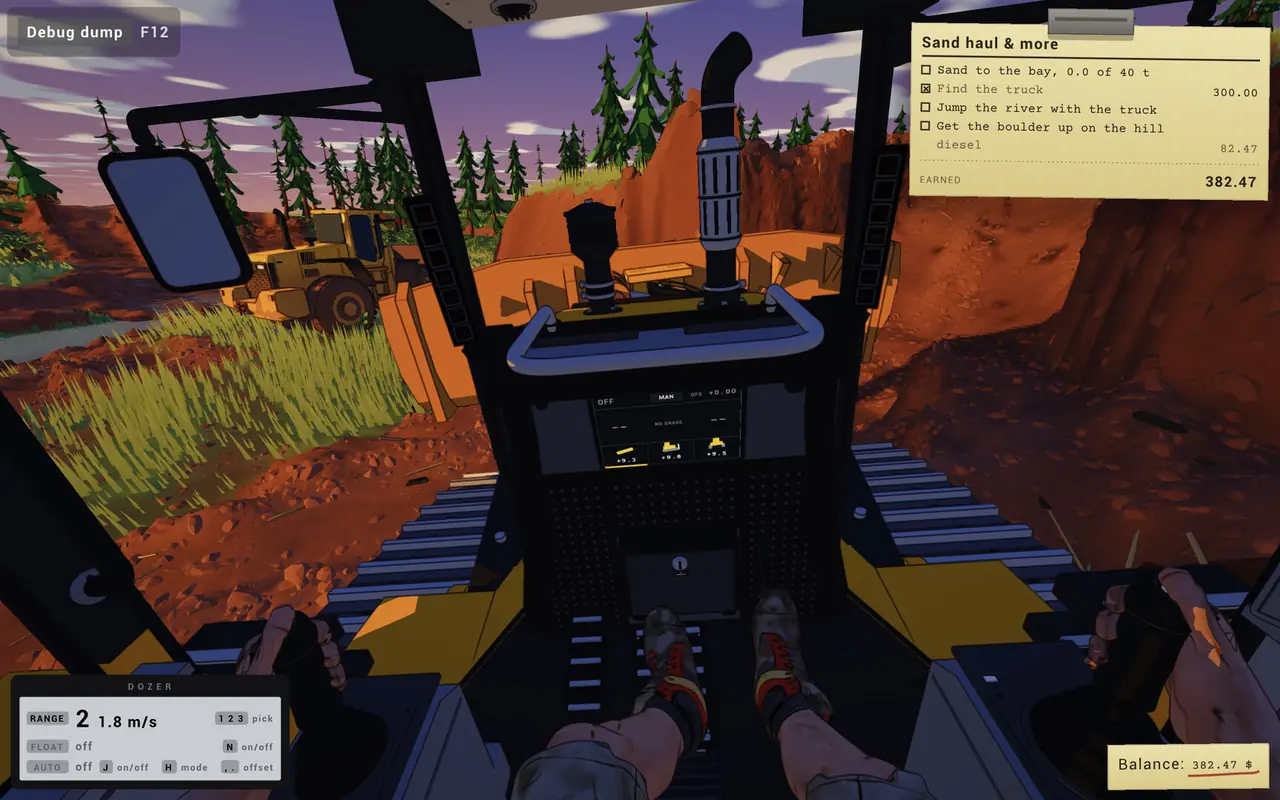
When you drive a machine, a small grey panel in the lower-left corner names it and lists its modes. Each line has a label (RANGE, FLOAT, AUTO, HOOK, LIGHT, GRIP), its current state, and the key that changes it. With a gamepad the same panel shows controller buttons instead. In-game UI The panels below are rebuilt from the official screenshots, so they match what you see in game.
Keys by machine
Dozer
Dozer · gamepad
Dozer
- RANGE (1 to 3): 1 2 3 pick a speed range · pad: Y pick range
- FLOAT (off / on): N blade float on/off · pad: A float on/off
- AUTO (off / ready +0.34): J auto-level on/off; H blade mode (free tilt); , . offset the target level · pad: B auto on/off, Y mode, offset
Top speeds shown: Range 2 = 1.8 m/s, range 3 = 2.6 m/s (about 6.5 and 9.4 km/h).
Float lets the blade ride the ground instead of holding a fixed height. AUTO shows "ready" with a number when it has a target level; the comma and period keys shift that target.
Loader
Loader · gamepad
Wheel loader
- RANGE (1 to 4): 1 2 3 4 pick a speed range · pad: Y pick range
- HOOK (off / on): K hook on/off · pad: D-pad right hook
Top speeds shown: Range 4 = 14.0 m/s (about 50 km/h).
Players count buckets: one forum reviewer felt 3 loader buckets filled the dump truck with too little left on the ground, so expect volumes to be tuned.
Hauler
Hauler · gamepad
Hauler
- RANGE (1 to 4): 1 2 3 4 pick a speed range · pad: Y pick range
- LIGHT (off / on): L lights on/off
Top speeds shown: Range 4 = 14.0 m/s (about 50 km/h).
The demo store page says to haul sand "and see if your road can handle it": a loaded hauler is the test of your road.
Excavator
Excavator (Early Access)
- GRIP (open / closed): N grip open/close
- LIGHT (off / on): L lights on/off
The grip suggests a thumb or grapple for holding rocks and logs. The store page also lists drilling into rocks to hook them.
All panel keys in one table
| Key | Machine | Panel line | Does |
|---|---|---|---|
| 1 2 3 | Dozer | RANGE | pick a speed range |
| N | Dozer | FLOAT | blade float on/off |
| J | Dozer | AUTO | auto-level on/off |
| H | Dozer | AUTO | blade mode (free tilt) |
| , . | Dozer | AUTO | offset the target level |
| 1 2 3 4 | Wheel loader | RANGE | pick a speed range |
| K | Wheel loader | HOOK | hook on/off |
| 1 2 3 4 | Hauler | RANGE | pick a speed range |
| L | Hauler | LIGHT | lights on/off |
| N | Excavator | GRIP | grip open/close |
| L | Excavator | LIGHT | lights on/off |
The same letter does different things on different machines: N is float on the dozer but grip on the excavator. In-game UI
Dozer modes explained
- RANGE (1 2 3)
- Speed range, like a gear lever. The panel shows the range and top speed: range 2 is 1.8 m/s, range 3 is 2.6 m/s. Use a low range for fine grading. In-game UI
- FLOAT (N)
- Lets the blade follow the ground under its own weight instead of holding a set height. Good for smoothing a pass in reverse.
- AUTO (J), mode (H), offset (, .)
- Automatic blade levelling. The store page describes "auto leveling system with slopes and curves. Set sticks, auto level with the dozer." When on, the panel reads ready plus the offset, such as +0.34. Comma and period nudge the target up or down, and H switches the blade mode (one build labels it "free tilt"). Official In-game UI How to use it for roads is on the road building page.
Other keys you will see
- F12 Debug dump. Labelled in the top-left corner; it is there for bug reports. When the game will not start, the developer asks for
dirttown.logon Discord. In-game UI Players - Backspace Reset vehicle, according to players. Not confirmed by the developer. Players
- Driving, camera and on-foot keys are not printed on the panels. Check the game's settings for them. Some players found the default camera hard to get used to. Players
Gamepad, wheel and joystick
Steam lists partial controller support. On a gamepad the panel swaps to button glyphs: Y picks the range, A toggles dozer float, B toggles auto level, and D-pad right works the loader hook. Official In-game UI
The store page says the game supports "most peripherals from gamepads to joysticks and wheels". A player reports the Simtask Farmstick working in the demo; HOTAS and wheel setup questions are still open in the forum. Official Players Players
Questions
How do I turn on auto level on the dozer in Dirt Town?
Press J. The dozer panel's AUTO line switches from off to ready and shows the target offset, for example ready +0.34. The comma and period keys shift that target, and H changes the blade mode.
What does float do on the dozer?
Float, toggled with N, lets the blade ride on the ground instead of holding a fixed height. It is useful for back-dragging and smoothing a surface.
How do I change gear in Dirt Town?
Machines have speed ranges instead of gears. Press 1, 2 or 3 on the dozer, or 1 to 4 on the loader and hauler. On a gamepad, Y picks the range.
Does Dirt Town support controllers, wheels and joysticks?
The Steam page lists partial controller support and says most peripherals work, from gamepads to joysticks and wheels. A player reports a Simtask Farmstick working in the demo.
How do I reset a stuck vehicle?
Players in the Steam forum suggest Backspace. The developer has not confirmed it, so check the key bindings in your build.
Sources
- In-game UI Official screenshots: mission card and machine panels Steam store page, checked Nov 16, 2026
- Official Dirt Town store page (About, Early Access FAQ, requirements) Steam, checked Nov 16, 2026
- Official Dirt Town Demo store page Steam, checked Nov 16, 2026
- Players Demo review Steam forum, checked Nov 16, 2026
- Players JoyStick/Hotas/Wheel Setup Steam forum, checked Nov 16, 2026
- Players Winch? Steam forum, checked Nov 16, 2026
- Players GAME IS NOT STARTING (developer asks for dirttown.log) Steam forum, checked Nov 16, 2026
Labels: Official = Skyturns on Steam, YouTube or Discord. In-game UI = read from the official screenshots. Players = Steam forum reports. Video = player gameplay videos. How we source.